


RoomBooking: Rental Calendar
0.00.00 Reviews
App Specs
- Version
- 1.70.0
- Updated On
- License
- Free
- Downloads
- 10,000+
- Developer
- ROOMBOOKING LLP
- Categories
- Business
- Platform
- Android
Screenshots
 Analysis by AppCompare
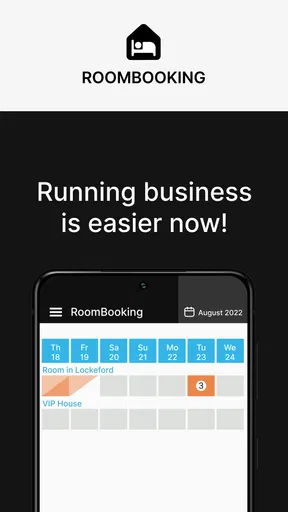
When I first opened RoomBooking: Rental Calendar, I understood its appeal quickly: it is a business app built around organizing bookings for hotels, guest houses, and other rentable objects without forcing the user to begin with a complicated management system. I would describe it as a focused calendar tool rather than a complete hotel operation platform. That distinction matters, because it can be very useful for keeping availability visible, while a larger property-management system may be a better fit for payments, guest communication, housekeeping, or detailed reporting.
The app is free to install and is suitable for Everyone, which makes it approachable for an owner who wants to test a booking calendar without committing to a large service immediately. It comes from ROOMBOOKING LLP and has passed the ten-thousand-install mark. In my experience, its strongest value is the simple visual idea behind it: instead of relying on loose notes, messages, or several separate calendars, I can use one place to think about occupied and available dates.
What to expect before creating a booking
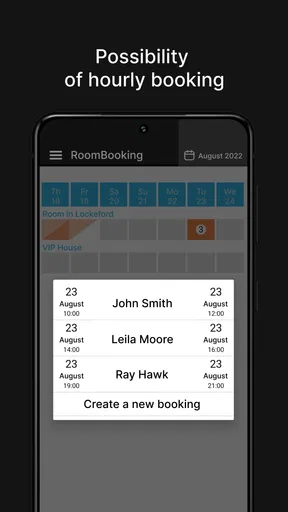
The most useful way to approach this app is to treat it as a shared planning surface for rental availability. A calendar is especially helpful when a property receives reservations through several channels. Even if the original request arrives by phone or message, recording it in the same calendar gives me a clearer view of which dates are already committed and which can still be offered.
That sounds straightforward, but the benefit is not only visual. A reliable calendar changes the order in which I make decisions. Rather than promising a room first and checking availability later, I can check the schedule before answering. For a small guest house, this simple habit can prevent overlapping reservations and reduce the need to reconstruct the booking history from conversations.
I would not expect the app to replace every tool used by a professional accommodation business. The store summary presents it as a calendar for booking hotels, guest houses, and other objects, so the central experience is scheduling. If I needed accounting, automated invoices, channel synchronization, detailed customer records, or a full front-desk workflow, I would compare it with a dedicated property-management service instead of assuming that a calendar alone covers those jobs.
There is also an important practical distinction between a calendar being easy to open and a calendar being easy to maintain. The first booking may feel simple, but the system only becomes dependable when every confirmed stay, cancellation, and date change is recorded consistently. I recommend deciding on one rule before using it: enter a reservation as soon as it becomes firm, rather than waiting until the guest arrives or pays.
That rule is one of the less obvious ways to get more value from a booking calendar. It turns the app from a passive display into an operational habit. If several people manage the same property, agreeing on what counts as a confirmed reservation is just as important as learning where to tap. Otherwise, an apparently open date may actually be waiting for a verbal confirmation.
Worth Reading Before You Choose

Flipboard Shows What News Apps Must Do Beyond the Feed

Switching to Android Auto Means Rethinking Your Driving Routine

Google Calendar Makes a Crowded Week Easier to Manage

Ludo King Makes the Most of the Minutes Between Plans

Baby Panda World Brings Quick Play to Modern Phones, but Its Game Library Feels Busy

ESPN’s Live Game View Makes Following Close Games Easier
Who will benefit most from it
I see the best match in independent hosts, small accommodation teams, and people managing a limited number of rooms or rental objects. These users often need a visual overview more than a large collection of administrative tools. The app can also make sense for someone moving away from paper notebooks and scattered phone messages, because the calendar format is easier to scan when answering a new inquiry.
A first-time user should also appreciate that the app is not positioned as a luxury purchase. The basic download is free, while in-app purchases range from $1.99 to $64.99 per item. I would check the purchase screen carefully before confirming anything, especially if I only want to test the calendar. The free entry point lowers the barrier to trying it, but it does not mean every possible function is necessarily included without charge.
The app is less suitable for a large hotel with complex room types, multiple departments, or a need for automated distribution across booking websites. It may also be the wrong choice for a host who wants a guest-facing booking website rather than an internal calendar. In those cases, a specialized platform with broader automation could save more time, even if it takes longer to learn.
From installation to a meaningful first result
I’d make the first session deliberately modest: choose one rental object and enter a confirmed stay whose dates you already know. That gives you a concrete way to check whether the calendar reflects your availability as you expect, before you rely on it for a new inquiry. Once that small test feels clear, the next useful question is how to keep the calendar dependable as bookings change.
Start with a small, real example
My advice for a first session is not to enter an entire business history. Begin with one property or one room that you understand well. The goal is to create a useful picture of availability, not to make the calendar perfect in one sitting. Starting small also makes it easier to notice how the app represents a booking, an open date, and a change to an existing reservation.
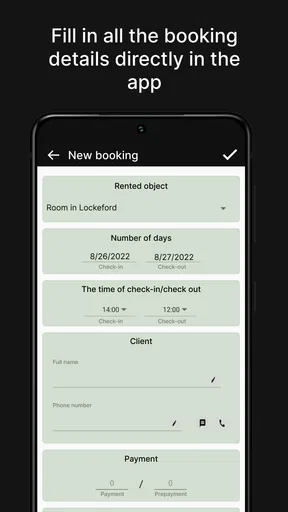
Before entering anything, I would gather the information that affects the schedule: the object being rented, the arrival date, the departure date, and any internal label needed to recognize the reservation later. Keeping those details ready reduces the temptation to create vague entries that look clear today but become confusing after several weeks.
The app’s calendar format encourages date-based thinking, so I would pay close attention to the difference between the night of arrival and the day of departure. This is a common source of mistakes in any rental calendar. A guest leaving in the morning may make the room available for a later arrival, but the schedule must represent that transition consistently. The safest approach is to use the same convention for every booking and explain it to anyone else who edits the calendar.
Once the first reservation is entered, I would immediately look at the surrounding dates rather than stopping there. This is where the calendar becomes meaningful: I can see the booking in relation to the days before and after it. That quick check helps reveal whether the entry occupies the intended period and whether a nearby reservation needs attention.
A realistic first-day workflow
Imagine that I manage a small guest house and receive a message asking for a room over a weekend. I would first open the calendar and inspect the requested period. If those dates are available, I would add the reservation while the details are fresh. Then I would return to the calendar view and confirm that the occupied period appears where I expected it to appear.
Afterward, I would use the same screen to answer the next inquiry instead of keeping the first request in a separate chat. This is the first meaningful success: not merely creating an entry, but using the updated calendar to make a better decision about another request. The value comes from the sequence of checking, recording, and checking again.
A useful habit is to review the calendar at the beginning and end of each day when bookings are active. In the morning, it can help identify arrivals and departures that need attention. At the end of the day, it can serve as a quick check that new confirmations and changes were actually recorded. I would not treat this as a substitute for a formal operations checklist, but it is a practical way to reduce forgotten updates.
Another helpful workflow is to enter tentative requests in a way that does not look identical to confirmed stays, if the app’s available labeling options support that distinction. I would never rely on memory to remember which dates are merely being discussed. If the calendar cannot clearly separate tentative and confirmed reservations in the way I need, I would keep a small accompanying note or use a more advanced booking system for that part of the process.
How to avoid a misleadingly tidy calendar
A calendar can look organized while still containing incomplete information. For example, a blocked date without a recognizable guest or booking label may prevent a double booking but make later follow-up difficult. I prefer entries that answer three questions at a glance: what is occupied, which object is involved, and why the date is blocked.
This is especially important when a property has more than one room or rental object. A single general calendar may prevent me from seeing the difference between an occupied room and an unavailable room that is being repaired or held for another reason. I would establish a naming pattern early, using short and consistent labels rather than changing terminology from one reservation to the next.
The trade-off is that more detail improves clarity but takes longer to enter. For a solo host with only occasional bookings, a concise entry may be enough. For a team, the extra seconds spent making labels consistent can prevent much longer conversations later. RoomBooking: Rental Calendar is most effective when the user supplies that discipline; the calendar itself cannot decide what information the business needs to remember.
Common points of confusion
The first likely confusion is expecting the app to behave like a marketplace where travelers search for rooms and complete a reservation. I would approach it as a management calendar first. If my aim is to attract new guests, take online payments, or publish live availability to a public booking page, I would look for another service or use this app alongside one.
The second confusion concerns the word “booking.” A booking calendar may record an arrangement, but recording it is not the same as collecting payment or sending a contract. I would keep those responsibilities separate unless the app clearly provides the exact workflow I require. This prevents me from assuming that a colored date on the calendar is proof that every administrative step has been completed.
Date changes deserve special attention too. If a guest extends a stay, I would update the calendar immediately and then inspect the newly affected dates. If a reservation is shortened or canceled, I would make sure the old occupied period is no longer blocking availability. The important step is not just editing the entry; it is checking the consequences of that edit on nearby requests.
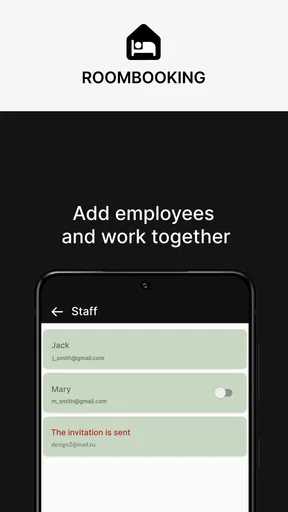
Another point to watch is shared use. If several people have access to the same booking information, they need a simple agreement about who updates the calendar and when. Without that agreement, two people can each believe the schedule is current while working from different assumptions. I would use the calendar as the central record only after deciding how changes are communicated.
There is also a sensible privacy consideration. A booking calendar can contain personally identifiable guest details, so I would avoid entering more personal information than is necessary for the scheduling task. Short internal identifiers may be safer and easier to scan than a full collection of guest data. For sensitive records, I would follow the business’s privacy procedures rather than treating a calendar as a complete customer database.
Where it fits beside familiar alternatives
The closest everyday alternative is often a general calendar app. A standard calendar may be excellent for appointments, reminders, and personal events, but it usually requires more manual interpretation when several rooms or rental objects are involved. A booking-focused calendar has a clearer purpose, which can make availability easier to review. The trade-off is that a general calendar may connect more naturally with other daily activities.
A spreadsheet offers another familiar option. Spreadsheets can hold rich notes, custom columns, prices, and formulas, but they demand careful formatting and maintenance. I would choose a spreadsheet when I need detailed financial tracking or a highly customized report. I would choose RoomBooking: Rental Calendar when the immediate problem is seeing occupied and open dates without building the system myself.
A full property-management platform is the more powerful alternative. It may be preferable for a growing operation that needs automated workflows, multiple sales channels, staff roles, or comprehensive reporting. However, that extra capability can also create setup work that a small host does not need. The practical question is not which tool has the longest feature list, but whether the business problem is scheduling alone or scheduling plus a wider set of operations.
For me, the app occupies a useful middle ground: more purpose-built than a blank personal calendar, but potentially less demanding than a full accommodation-management suite. That makes it easier to recommend for a first step, provided the user understands the boundary. I would not buy into it as a promise that every hotel-management task will disappear.
What to do after the first successful booking
Once the first real reservation is visible, the next step is to build a repeatable review routine. I would inspect upcoming dates, look for gaps that need clarification, and confirm that each rental object follows the same naming convention. This is also the right moment to decide whether the free version is enough for the way I work or whether an in-app purchase is justified by a specific need.
Because purchases range from $1.99 to $64.99 per item, I would avoid upgrading simply because an option is available. I would first identify the friction I am trying to remove. If the calendar already handles my small booking workload, paying may not improve anything. If a paid function directly supports a recurring task, I would evaluate its value against the time saved rather than treating the highest-priced option as automatically better.
The app runs on Android devices using version 7.0 or later, and its current version is 1.70.0. That makes checking device compatibility a sensible first step before asking a team to adopt it. The application was released on May 11, 2019, so I would also keep the app updated through the normal store process and test the workflow again after major changes, especially if the calendar is central to daily operations.
My final recommendation is intentionally practical. I would suggest RoomBooking: Rental Calendar to a small host who needs a dedicated way to see reservations and wants a gentle path away from paper or scattered messages. I would start with one real room, one confirmed stay, and a deliberate check of the dates afterward. If that process makes availability easier to understand, the app has already proved its value.
I would skip it when the main requirement is a public reservation engine, advanced hotel administration, or deep financial control. For everyone else, its strength is its focused starting point. The best result comes from using the calendar as the single scheduling habit, not from expecting it to become an entire business system. That is the honest reason I would recommend giving it a careful trial: it can make the first step toward organized rental management much less intimidating, as long as I keep its role clear.
Pros
- Simple calendar view makes bookings easy to track.
- Useful for managing multiple rooms or rental properties.
- Quickly identify available and occupied dates.
- Helps reduce double-booking risks.
- Suitable for both personal and small business rentals.
Cons
- Advanced reporting and analytics may be limited.
- Some features could require in-app purchases or a subscription.
- May lack integrations with popular booking platforms.
- Manual data entry can become time-consuming for busy hosts.
- Customization options may not meet every property manager’s needs.
FAQs for RoomBooking: Rental Calendar
What is RoomBooking: Rental Calendar used for?
RoomBooking: Rental Calendar is designed to help property owners, hosts, and small rental businesses organize reservations in one place. After reviewing its workflow, the app appears focused on managing booking dates, checking availability, and reducing scheduling conflicts. It can be useful for rooms, apartments, vacation rentals, or other rentable spaces where a clear calendar is more practical than managing reservations through notes or spreadsheets.
Can I manage multiple rooms or rental properties with the app?
The app is intended for rental scheduling, so it may be suitable for users handling more than one room or accommodation. Before downloading, check how the current version structures properties, rooms, and calendars, since the available organization tools can vary by device and subscription plan. Users with a single rental should find it straightforward, while larger operators may need to confirm whether it supports their preferred multi-property workflow.
Does RoomBooking: Rental Calendar work offline?
Offline availability is an important consideration for hosts who manage bookings while traveling or in areas with unreliable internet access. The app may allow some calendar information to remain accessible on the device, but features such as synchronization, cloud backups, sharing, or updates generally require an internet connection. Review the app’s latest store description and permissions before relying on it as your only booking record.
Is RoomBooking: Rental Calendar free to download and use?
RoomBooking: Rental Calendar may be available to download without an upfront charge, but the exact pricing model can depend on the platform, region, and current release. Some features in rental-management apps can be limited by advertisements, in-app purchases, or premium plans. Check the Google Play Store or Apple App Store listing carefully to see whether advanced calendars, additional properties, backups, or other tools require payment.
Is the app suitable for professional rental management?
RoomBooking: Rental Calendar can be a practical option for independent hosts and small rental operations that mainly need a simple reservation calendar. However, users managing a large portfolio should verify whether it includes features such as automated guest communication, payment processing, cleaning schedules, reports, team access, and channel synchronization. It is best viewed as a scheduling tool unless the current version clearly provides broader property-management functions.


